
Customer support
All registered users can open a support ticket and track its status and responses from our team.

CONNECT HELPCENTER · ORDERS AND CUSTOMERS
Understand the relationship between suppliers, the Digital Catalog, and your store, and prepare the data required for Connect administration to link the appropriate product source.

The screenshots use the English interface and sample data. Numbers link locations in the image to the localized instructions. Click the image for a larger view. Actual orders and customer data were not changed for the demonstration.
Supplier provides products and supply data for the seller. In this model, it does not sell directly to the end customer through your store. Seller shapes its offer, terms, and relationship with the customer. Digital Catalog represents a source of items that, when the appropriate connection is available and agreed upon, can be included in the sales process.
The mere existence of a supplier in the records does not mean that imports, automatic price and inventory updates, or automatic order submission to the supplier are enabled. Digital Catalog functions are activated according to the module actually available and the agreed integration.
The screenshot shows Connect administration → Customers → Suppliers, with sample data. This menu is not available in the reviewed vendor account, so this is not a path that every seller should open themselves. Request the connection from the Connect team.
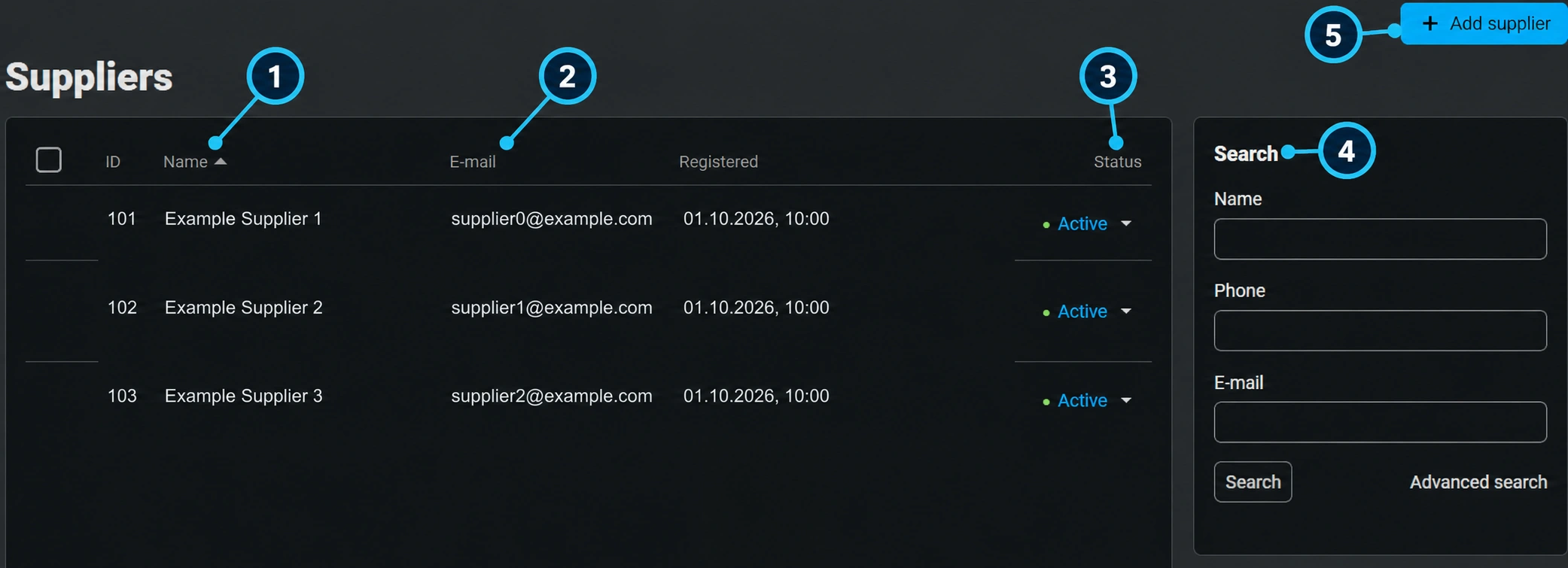
The name (1) distinguishes offer sources. In your request, provide the full business name, not just the brand name, which may have multiple distributors.
The email (2) is used to record the responsible contact. By itself, it does not mean that an automatic order flow is enabled.
The status (3) describes the activity of the supplier record. It is not the same as the availability of each item or permission to sell it.
Connect administration finds the supplier by name, phone, or email through the search (4). The seller provides these details if available.
The add action (5) belongs to the responsible administration. After the record is created, the catalog source and connection method must be agreed separately.
Specify the source and desired scope. Do not send access secrets in a public conversation or in images.
Confirm whether only basic data or also prices, inventory, and changes are imported. Record the update frequency and what happens when an item disappears from the source.
Compare identifiers, variants, photos, categories, features, and prices. Categories and their mapping are coordinated with Connect administration.
Check the margin/selling price, delivery, and availability. The supplier's purchase data is not automatically the final price for the customer.
Use the add from the Digital Catalog procedure when it is enabled. Do not manually overwrite data that active synchronization will later import again without an agreed rule.
After a purchase, ensure ordering and supply according to the agreed flow. Do not assume that a regular customer order automatically orders goods from the supplier.
Record the item code, expected data, display in the store, and the time the source was checked. Check whether it is an update delay, currency, packaging, or another variant. Until availability is clarified, do not confirm a lead time that the supplier has not confirmed.

